


In April 2026, Anthropic Labs launched Claude Design, a conversational visual creation tool that turns prompts, screenshots, documents, or even an existing codebase into working prototypes, presentations, and one-pagers. It is the most visible move yet by Anthropic to step beyond chat and coding into the application layer that has traditionally belonged to companies like Figma, Adobe, and Canva.
For teams already using Claude for strategy, content, or development work, Claude Design closes an obvious gap: the step where an idea has to become something visible before anyone can react to it. This article covers what Claude Design actually is, how the workflow works in practice, and the use cases where it pays off the fastest.
What is Claude Design?
Claude Design is a product from Anthropic Labs that lets you create and refine visual work by having a conversation with Claude, instead of starting from a blank canvas in a traditional design tool. It is powered by Claude Opus 4.7, Anthropic’s most capable generally available model, released the day before Claude Design itself on April 16, 2026.
The product sits somewhere between a prototyping tool, a presentation builder, and an AI-assisted front-end environment. You can use it to produce:
- Interactive prototypes and mockups
- Pitch decks and presentations
- Landing pages and marketing one-pagers
- Internal tool UIs and admin dashboards
- Mobile app flows and onboarding screens
- Marketing collateral and social media visuals
It is available in research preview to Claude Pro, Max, Team, and Enterprise subscribers. For Enterprise plans, the feature is off by default and has to be enabled by an administrator.
How Claude Design works
The interface has two main areas: a chat panel on the left and a live canvas on the right. You describe what you want, Claude generates a first version on the canvas, and you refine from there.
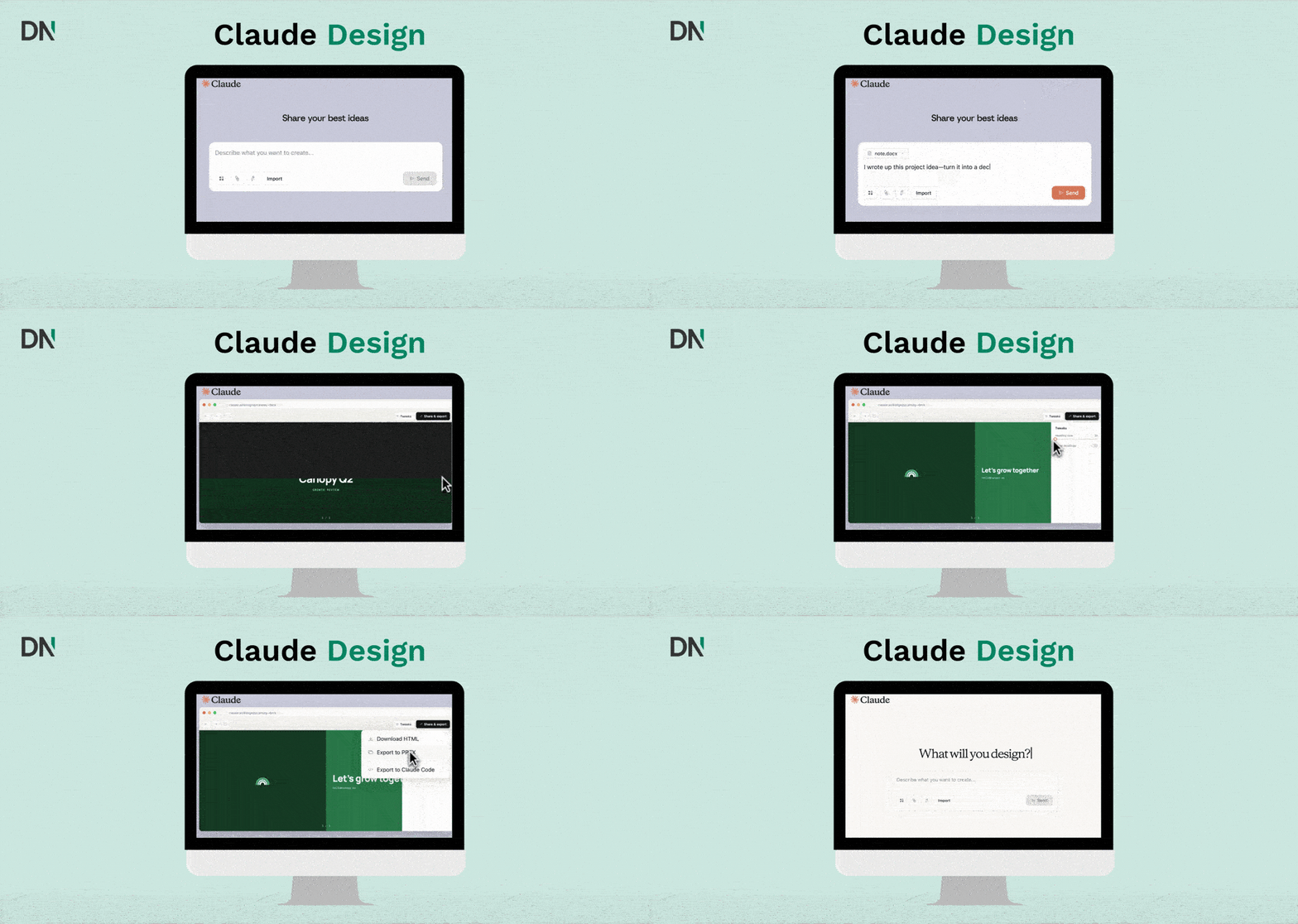
Starting a project
You can begin a project in several ways:
- From a text prompt: A description like “Design a mobile app onboarding flow with four screens that walks users through our core features.”
- From uploads: Images, screenshots, or documents in DOCX, PPTX, or XLSX format.
- From your codebase: Point Claude at a repository or specific subdirectory so it can read your existing components and tokens.
- From the web: A built-in web capture tool grabs elements directly from a live site so prototypes match the look of the real product.
Refining the design
Once Claude produces a first draft, you have four ways to iterate:
- Chat-based prompts for broad changes, like “Make the colour scheme darker and more minimal” or “Rearrange the dashboard so metrics are in the top row.”
- Inline comments on specific elements of the canvas for targeted edits.
- Direct text editing straight on the design.
- Adjustment sliders that Claude generates on the fly to tweak spacing, colour, and layout in real time.
You can also ask Claude to explain its design decisions, suggest improvements, or review a design for accessibility, which is useful in regulated sectors and public-sector work.
Design systems and brand consistency
This is the part that separates Claude Design from generic AI image tools. During onboarding, Claude reads your codebase and design files and builds a design system: colours, typography, and components. Every project after that uses your brand automatically. Teams can refine the system over time and maintain more than one, which is helpful for agencies and consultancies serving multiple clients.
Sharing and export
Once a design is ready, you can:
- Share it as an internal URL within your organisation (view, comment, or edit access)
- Save it as a folder for archival
- Export to PDF, PPTX, standalone HTML, or send it directly to Canva, where it becomes a fully editable Canva file
- Hand off to Claude Code as a structured bundle that includes the design intent, so a coding agent can implement it
The Claude Code handoff is the piece that makes Claude Design more than a prototyping toy. It tightens the design-to-development loop in a way that most static export formats cannot.
Use cases that pay off the fastest
Claude Design fits several roles, but the value is uneven. These are the use cases where teams are seeing the clearest wins in the first weeks of availability.
Founders and product managers: from idea to clickable prototype
A founder with a deck outline or a PM with a feature description can produce a working interactive prototype in a single conversation. Datadog’s product team reported compressing what used to be a week of briefs, mockups, and review rounds into one session. Brilliant reported recreating their most complex pages in two prompts instead of the twenty-plus it took in their previous tool.
Designers: faster exploration and user testing
Designers do not stop working in Figma or Sketch. Claude Design is faster for two specific tasks: generating a wide range of directions to explore early in a project, and turning static mockups into interactive prototypes that can be shared and user-tested without code review or pull requests.
Sales, marketing, and account teams: on-brand decks in minutes
A founder, account executive, or marketer can go from a rough outline to a complete, on-brand deck in minutes and then export to PPTX or send to Canva for final polish. For consultancies and agencies, this is where Claude Design overlaps directly with workflows that previously sat in PowerPoint or Google Slides.
Engineering teams: tighter design-to-code handoff
The Claude Code handoff bundle is the headline feature for engineering. A designer or PM finishes a prototype in Claude Design, packages it with design intent, and passes it to Claude Code with a single instruction. Claude Code reads the bundle and implements the production version against the real codebase. One independent reviewer reported getting an interactive data-driven feature shipped end-to-end in roughly 45 minutes of active attention.
Internal tools and admin UIs
A typical “ugly but necessary” category: ops dashboards, approval workflows, content review tools, intake forms. Claude Design produces clean, branded versions of these quickly, which is the kind of work that rarely justifies a dedicated designer but still benefits from being usable.
Public sector and municipal work
For Dutch municipalities and other public sector clients working under Archiefwet, Woo, or similar transparency requirements, Claude Design is useful for producing accessible mockups of citizen-facing portals, intake flows, or data dashboards before any code is written. Combined with the accessibility review prompt, it shortens the feedback loop with policy and communications teams who do not work in design tools themselves.
What Claude Design is not
Worth being clear on the limits. Anthropic has been transparent about these.
- Not a full design tool. Collaboration is basic and not yet fully multiplayer. Figma, Sketch, and Adobe XD still own the deep design-team workflow.
- Not a polished production tool. It is in research preview, and the editing experience has rough edges. Inline comments occasionally disappear, the compact view can trigger save errors, and linking very large monorepos causes lag.
- Only as good as your inputs. The design system import works well with a clean codebase. Messy source code produces messy output.
- Still needs human judgment. The model is good at generation, less good at the sensitive product decisions: when to aggregate versus show raw numbers, what to hide for privacy, where to place a conversion-sensitive element. Those calls remain with you.
How Claude Design fits in the broader Claude stack
Claude Design is one piece of a larger product stack that all runs on the same model family. For teams already using other parts of the stack, the integration is the value:
- Claude Opus 4.7 powers the generation, with state-of-the-art vision and a 1,000,000-token context window.
- Claude Code picks up the handoff bundle and implements the production version.
- Claude Cowork handles the surrounding desktop work: file creation, document editing, and domain-specific plugins for legal, finance, HR, and operations workflows.
- Claude in Chrome can capture live web elements into Claude Design and test prototypes in a real browser session.
- MCP (Model Context Protocol) connects all of this to the rest of the tool stack, so Claude Design output can flow into the same systems where your tickets, files, and data already live.
Pricing and access
Claude Design is included for Claude Pro, Max, Team, and Enterprise subscribers at no extra cost during the research preview. There is no general availability date yet. Anthropic has said this is intentional: they want product and user feedback to determine when the tool is ready for full release. This is the same playbook Anthropic used with Claude Code, which launched as a bundled feature and grew into a major revenue driver before getting its own pricing.
Conclusion
Claude Design is the most concrete example yet of what “AI as the workspace” looks like in practice. Instead of generating an image you then have to recreate in a real tool, it produces working artefacts inside a design system you control, ready to share, export, or hand off to engineering. For founders, PMs, and consultants who spend a lot of time turning ideas into something visible, it removes a lot of friction. For designers and engineers, it changes the shape of the handoff.
The tool is still in research preview and has rough edges, but the workflow is the part to pay attention to. It is the same pattern Claude Code introduced for engineering, applied to visual work: describe what you want, iterate in conversation, hand off a clean bundle when you are done.
For organisations thinking about where Claude Design fits alongside their existing design and development tools, a clear AI strategy is the practical starting point. The fastest wins in the first few months are usually internal tools, sales decks, and prototype-to-Claude-Code workflows, not full-team Figma replacements.
Frequently asked questions (FAQ)
Who is Claude Design for?
Two main groups: non-designers who need to produce visual work (founders, PMs, marketers, account executives, ops leads) and designers who want a faster way to explore directions and turn static mockups into interactive prototypes.
Does Claude Design replace Figma or Canva?
No. Anthropic positions it as complementary. Designers continue to use Figma or Sketch for deep design work, and Canva remains the destination for collaborative editing and publishing, with a direct export path from Claude Design to Canva.
What can I export to?
PDF, PPTX, standalone HTML, internal share URLs, Canva, and a structured Claude Code handoff bundle.
How does Claude Design know my brand?
You point it at your codebase and design files during onboarding. Claude reads the CSS tokens, components, and typography, and builds a design system that gets applied automatically to every project. You can refine it over time and maintain more than one for teams or agencies that work across multiple brands.
What plan do I need?
Claude Pro, Max, Team, or Enterprise. On Enterprise plans, the feature is off by default and has to be enabled by an administrator.
Which model powers Claude Design?
Claude Opus 4.7, released on April 16, 2026. It is Anthropic’s most capable generally available model, with state-of-the-art vision (around 3x higher image resolution than Opus 4.6) and strong performance on agentic coding and design-related benchmarks.
What about accessibility reviews?
You can ask Claude to review a design for accessibility directly in the chat. This is particularly useful for public sector and regulated industry projects where WCAG compliance has to be checked before development starts.


